Volatile news. Stable spend.
Read the latest in the Coupa Business Spend Index™ Quarterly Update.
Get the Report





The market winced. Business spend held firm.
The Coupa Business Spend Index™ Quarterly Update

A forged bank letter came through one of our customers’ payment workflows this year. The supplier email address was legit and it matched their records. Even though a human may not have spotted the fake, an agent did and stopped the fraud in its tracks.
October is Cybersecurity Awareness Month, and this year’s theme — “Don’t make it easy for them” — lands close to home for anyone who approves payments.
I want to start with something that happened in a live customer environment this year, because it changed how I talk about this risk.
A request came in to confirm a supplier’s banking details, supported by a bank letter attached to the email. Standard stuff. The kind of document an AP team sees every week and usually approves in a couple of minutes.
And here is the part I want you to sit with: The email address on that letter matched what was already on file. The primary check a human reliably performs — does the email match our record? — passed.
The letter was a forgery anyway.
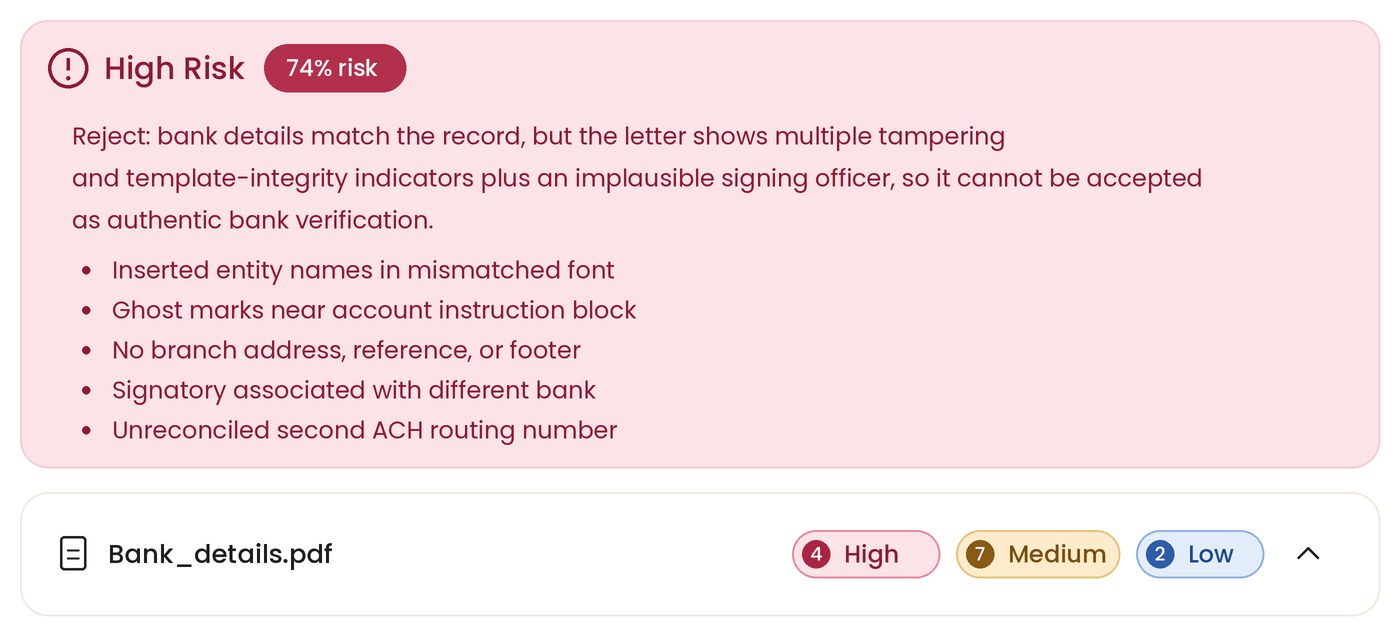
Coupa Pay’s Payment Account Data Verification Agent scored the document at 74% risk, raised 13 detected signals (4 high, 7 medium, 2 low), and recommended Reject — before a human had accepted it.
What the agent saw that a person may not have:
Read that list again and ask honestly whether anyone on your team would have caught font weight, residual ghost strokes, and a signatory’s bank affiliation while clearing a payment run on a Friday afternoon.
This is not a rare event. It is the routine shape of the most expensive incidents we see.
to business email compromise in 2025 alone, across 24,768 reported incidents — an average of more than $122,000 each. Most of it moved by wire or ACH, which is to say: fast, and hard to claw back.
Three controls address most of this exposure. I’ve put them in the order I’d actually implement them.
This is first for a reason. Detection and verification are not the same job, and neither one replaces the other.
Coupa Pay’s Payment Account Data Verification Agent validates supplier payment account data and interrogates the supporting documents, so questionable bank details are caught before funds are released. SpendGuard™ applies AI-driven fraud monitoring across invoices, expenses, and payments, flagging inaccurate payment details and vendor anomalies in real time. In the case above, that machine layer did its job and did it faster than a person could have.
But an agent recommending Reject is a signal to go and confirm, not a substitute for confirming. Every change to a supplier’s banking details warrants direct, out-of-band human confirmation — every time, including the ones that pass.
The verification standard I’d put in place:
A callback takes a few minutes. Set against an average loss of more than $122,000, it is the most cost-effective control in your accounts payable process.
A request to change banking details typically arrives looking entirely routine: correct branding, correct signature block, correct contact name, and frequently the correct email address — because the fraudster is operating from inside the supplier’s genuine mailbox, reading the invoice thread and timing the request accordingly.
Supplier mailboxes are compromised routinely, and a compromised mailbox sends authentic email from a legitimate domain. Any process that accepts a familiar sender alone as sufficient assurance is, in practice, unprotected.
MFA is the highest-return control available to you. It renders a stolen password largely useless, which matters because credential theft is the entry point for most payment-diversion fraud — including the compromised supplier mailboxes behind cases like the one above.
Enable it for all Coupa users, and for any system that can move funds or change payment instructions — starting with email. Authenticator apps are preferred over SMS, which is vulnerable to SIM-swap interception.
You can ask your suppliers to enable MFA as well. Multi-factor authentication is available to suppliers in the Coupa Supplier Portal, including on payment account updates — not only at login.
Many suppliers have never been asked. Adding the request to your onboarding pack, supplier communications and business reviews costs you nothing and directly hardens the account that holds your suppliers’ banking details.
The customer in that story did everything a reasonable team does. The numbers matched. The email looked right. What saved them was a layer that reads documents differently than we do — and a process that still made someone pick up the phone.
Build both. Don’t make it easy for them.
CTA button: Contact Your Coupa Team
Oh! It looks like you opted out from using the needed cookies. If you are interested in using the AI Agent, then please opt-in to the cookies in the preference center.
Update preferences